
Coming Soon: Our 3-Tier Chatbot – Smarter Keyword Mapping for Better Conversations
In today’s digital landscape, having a responsive and intuitive chatbot is more than just a trend—it’s a necessity. That’s why we’ve built our chatbot with a 3-tier system, each designed to handle different levels of keyword detection and content delivery. This structure allows the chatbot to engage more naturally with users, offering smarter answers based on the specificity and format of the input.
What Does “3-Tier” Mean?
Our chatbot is structured in three tiers, each designed to handle different types of functionality, particularly in how it fetches and processes keywords or topics. Here’s a breakdown of how each tier works:
Tier 1: Exact Keyword or Sentence Mapping (High Priority)
At the highest priority level, the chatbot looks for exact matches—either keywords or full sentences. This is the fastest and most accurate form of retrieval.
-
Example: If a user types “reset WordPress password”, the chatbot fetches a predefined answer tied directly to that exact phrase.
-
This method is perfect for specific queries or technical phrases that users are likely to enter verbatim.
Tier 2: Comma-Separated Keyword Mapping with Follow-up Responses (Medium Priority)
This level deals with a list of specific comma-separated keywords. Even if the user enters a phrase that’s not an exact sentence, the chatbot matches it with any keyword in its list and responds accordingly. It also supports follow-up responses, making the interaction feel more dynamic.
-
Example: The keywords “hi there, hello mate, good day” can all trigger the same greeting response.
-
Bonus: Some of these mappings may trigger sequential messages or clarifying questions, enhancing the conversation.
Tier 3: Subject or Title-Based Keyword Mapping (Low Priority)
When the chatbot can’t find a match in the first two tiers, it refers to subject-based keywords. These are broader topics organized under categories. When triggered, the chatbot pulls rich content—such as embedded HTML files, video iframes (e.g., YouTube), or external content—offering more detailed and visual responses.
-
Example: Typing “how to use ceiling hoist” might fetch an embedded YouTube tutorial or an HTML guide linked to the “Ceiling Hoist” category.
-
This tier functions like a smart library, providing access to content that may require more context or media.
Why Use a Tiered Chatbot System?
By using a tiered approach, we ensure that the chatbot:
-
Prioritizes speed and accuracy with exact queries
-
Remains flexible for varied, casual language
-
Offers rich content when needed, without overwhelming users
This makes it more than just a keyword bot; it becomes a smart, multi-functional assistant that adapts to the user’s intent.
What Happens When the Chatbot Doesn’t Find a Match?
Sometimes users might type a phrase or keyword that doesn’t exactly match any predefined entry. In such cases, our chatbot doesn’t stop—it intelligently guides the user toward helpful next steps.
As shown in the screenshot, when the user types something like "hi" and there’s no exact match, the chatbot responds with:
Tech Support: I couldn’t find a match for that keyword.
You can try using double quotes (e.g., “exact phrase”) to search for an exact match, or type “category” or “dir” to view available topics. Once listed, you can use the shortcut code to open a specific subject or title.
💡 This fallback message is part of Tier 2’s extended functionality, where instead of simply saying “Not found,” the chatbot:
-
Recommends how to refine the search
-
Suggests using helpful keywords like
"category"(to see categories) or"dir"(to see detailed listings) -
Introduces the use of shortcut codes (like
'd1'or'a1') for quicker access to topics
This makes the chatbot more interactive and less frustrating, especially for new users who aren’t sure what to type.
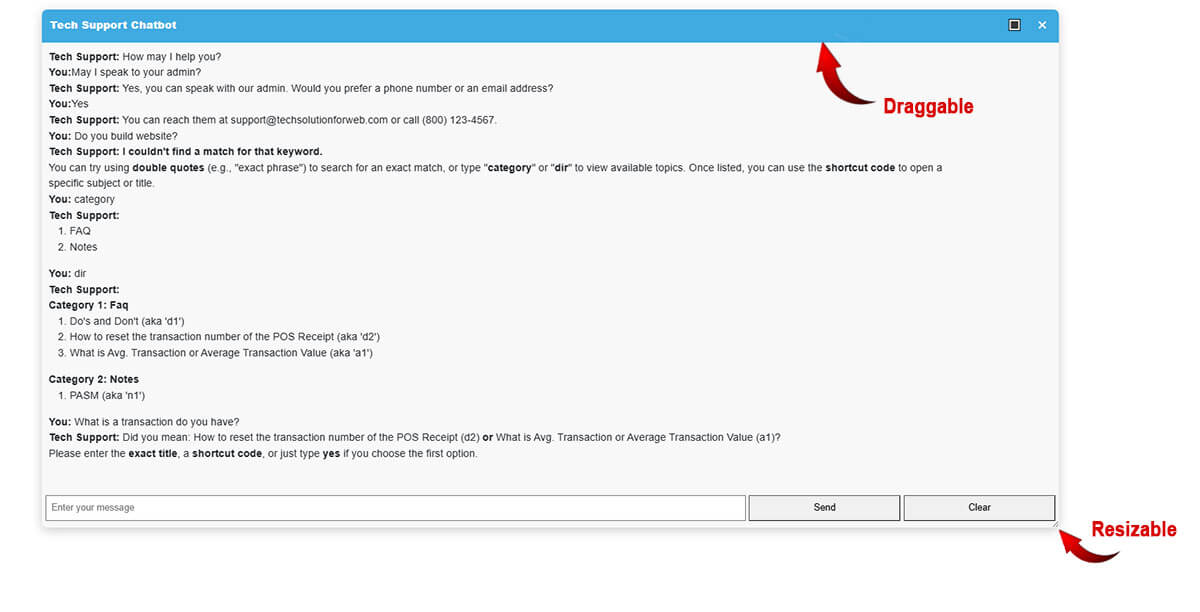
Example: Intelligent Prompt After No Match
Let’s say the user types:You: hi
The chatbot responds:
Tech Support: I couldn’t find a match for that keyword.
You can try using double quotes (e.g., “exact phrase”) to search for an exact match, or type “category” or “dir” to view available topics. Once listed, you can use the shortcut code to open a specific subject or title.
Then, after typing category, the bot replies with:
FAQ
Notes
And typing dir gives:
Category 1: FAQ
Do’s and Don’t (aka
'd1')How to reset the transaction number of the POS Receipt (aka
'd2')What is Avg. Transaction or Average Transaction Value (aka
'a1')
Category 2: Notes
PASM (aka
'n1')
This makes the chatbot not just reactive, but proactively helpful.

🧠 Smart Logging: Helping the Chatbot Learn What You Need
One of the standout features of our 3-tier chatbot is its ability to log every chat entry made by the user. This isn’t just for tracking, it’s for learning.
When users interact with the chatbot, every message they type is securely recorded. Why? Because it helps the chatbot:
-
🔍 Identify missing or unrecognized keywords
-
📚 Spot new topics or frequently asked questions
-
🚀 Train its knowledge base to grow smarter over time
This means that if a user asks something not currently in the chatbot’s library, that entry is flagged and can be reviewed to add predefined responses in future updates.
It’s how the bot becomes more intelligent, more useful, and more aligned with what users are actually looking for.
🔐 All entries are kept private and are only used for improving the chatbot’s performance and relevance. No personal data is shared or made public.
So every time someone uses the chatbot, it’s not just answering questions—it’s learning how to answer even better next time.
Want This on Your Website? Let Us Build It for You!
If you’re impressed with how our 3-tier Personal Assistant Smart Memory Bot works—combining exact keyword mapping, conversational follow-ups, and dynamic content delivery—imagine how it could enhance your own website.
Whether you’re running an eCommerce store, a corporate site, or a customer support portal, our chatbot can be tailored to meet your unique needs. We’ll build your website with this intelligent assistant fully integrated, so your visitors always get fast, relevant answers, boosting engagement and saving time.
Here’s what you get when you build your website with us:
-
A custom-built website tailored to your goals
-
Our Personal Assistant Smart Memory Bot is included and fully configured
-
Ongoing support and updates
-
Optional content loading via HTML, YouTube embeds, or custom data files
-
A smoother user experience, fewer support tickets, and higher satisfaction
💬 Ready to transform your website into a smarter, more helpful experience?
👉 Let’s talk! Your next-generation website assistant is just one step away.
Final Thoughts
Whether you’re saying a casual “hello” or asking for a specific tech guide, our chatbot knows how to respond thanks to its well-structured 3-tier keyword mapping system. It’s all about making the conversation as efficient, helpful, and human-like as possible.